
Spreadsheet – mdMoveValues / mdMoveValuesDL Formulas
Introduction
The mdMoveValues and mdMoveValuesDL formulas are part of the Sharperlight Excel formulas. However, they only function when imported into the Sharperlight Web Spreadsheet. These formulas can be used to design an entry form within the Web Spreadsheet, such as displaying referential values alongside the entry columns.
What they do
These formulas are used to move values from A to B.
- A is the source, which can be a cell, a range of cells, or a table.
- B is the destination where the source data is moved.
The difference between mdMoveValues and mdMoveValuesDL
As you can see, one of the formulas has “DL” at the end and is referred to as the “Delayed Formula.”
The delayed formula is triggered only when the spreadsheet is initially loaded, provided the “Recalculate Workbook” option is enabled for the spreadsheet.
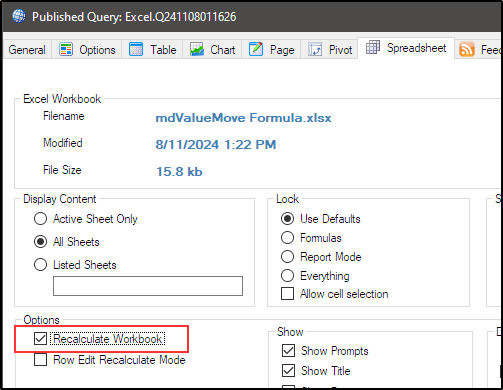
Once the spreadsheet is loaded, the delayed formula will not be triggered again, even if the recalculation process is forced. On the other hand, the mdMoveValues formula is always triggered when the workbook is initially loaded or whenever the recalculation process is initiated, either by Microsoft Excel or the user.
Parameters
They have three parameters: ‘Mode‘, ‘SourceCellOrRange‘, and ‘TargetCellOrRange‘.
Mode:
| 0 | Disable | Disable the formula |
| 1 | Move | Move the value(s) to the target place |
| 2 | Clear | Clear the value(s) in the target place |
| 3 | Clear & Move | Clear the target place and move the value(s) |
| 10 | Move Once | Same as 1, but forced to trigger once |
| 20 | Clear Once | Same as 2, but forced to trigger once |
| 30 | Clear & Move Once | Same as 3, but forced to trigger once. Negative (1,2,3,10,20,30) Not triggered when the workbook is initially loaded, and it is not triggered unless you intentionally trigger a recalculation |
SourceCellorRange: Specify the cell(s) or range for the source data you want to move.
TargetCellorRange: Specify the cell(s) or range where you want to place the value(s).
Example
Let’s look at an example here. An entry form is designed in a Microsoft Excel worksheet, which will then be imported into the Sharperlight Web Spreadsheet.
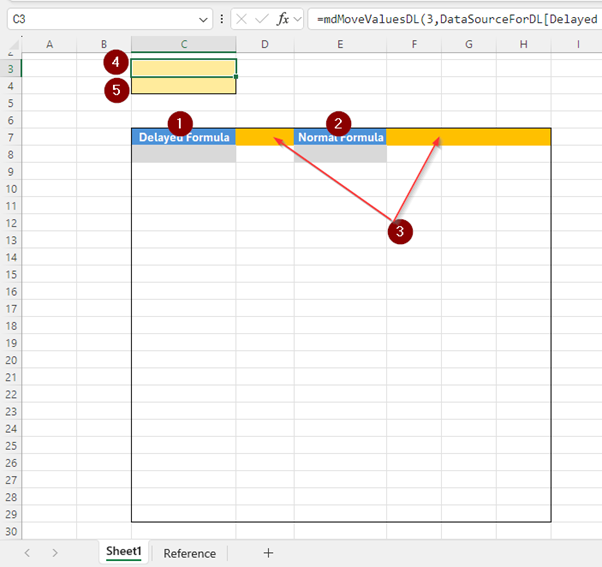
- Column C, where a set of reference values will be displayed, is defined in the ‘Reference’ sheet. The values will be displayed using the =mdMoveValuesDL formula.
- Column E, where a set of reference values will be displayed as well, is defined in the ‘Reference’ sheet. The values will be displayed using the =mdMoveValues formula.
- Columns D, F, G, and H are intended for entering values.
- The cell $C$3, where the =mdMoveValuesDL formula is defined.
Formula:=mdMoveValuesDL(3,DataSourceForDL[Delayed Formula],C8)
‘3’ is set for Mode, which means the formula clears the target and moves values from the source.
The second parameter points to the table on the ‘Reference’ sheet.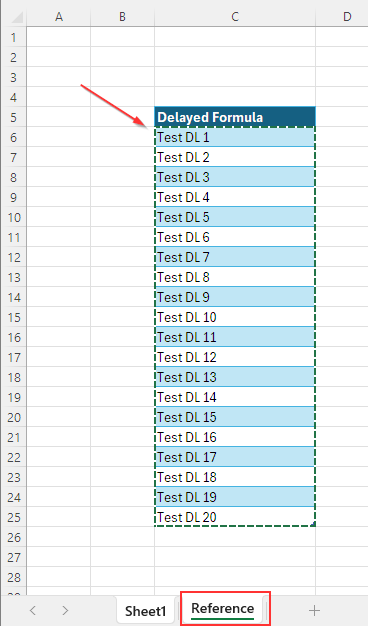
The third parameter specifies the target where the source values are placed. It points to cell C8 on the ‘Sheet1’ worksheet.
Therefore, when this formula is triggered, the target is cleared, and the values in the table on the ‘Reference’ sheet are copied to the anchor cell C8.
However, this is a delayed formula, so it is triggered only once when the spreadsheet is first loaded. - The cell $C$4, where the =mdMoveValues formula is defined.
Formula:=mdMoveValues(3,Reference!F6:F21,E8)
‘3’ is set for Mode, which means the formula clears the target and moves values from the source.
The second parameter specifies a range on the ‘Reference’ sheet.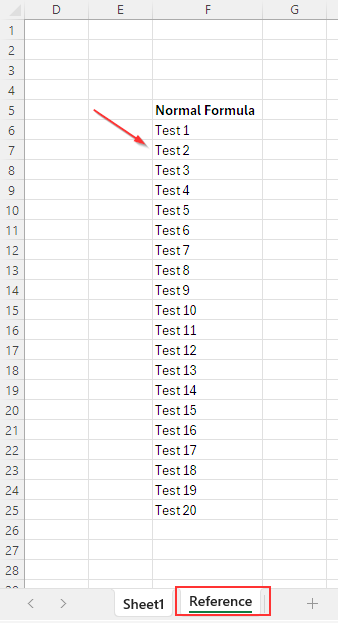
The third parameter specifies the target anchor cell E8 on the ‘Sheet1’ worksheet.
Therefore, when this formula is triggered, the target is cleared, and the values in the specified range on the ‘Reference’ sheet are copied to the anchor cell E8.
This is a standard formula, so it is triggered when the workbook is initially loaded or whenever the recalculation process is triggered.