
Periods – Convert Calender Periods / Dates to Financial Periods
This article deals with two topics, one is converting Calender Periods and the second is converting Calender Dates to a Financial Period or Date.
The conversion method uses special offsets and is applied to the Filter of the target Period or Date field. In most cases the conversion to a Financial Year is done relative to todays date but the offsets can also be applied to any date constant. Expressions can also be used to calculate Financal Periods where for example you want April 2015 to shown as Period 1 of 2016 (2016/1)
Period Fields
Sharperlight by default uses Calendar Years and Months for Periods unless the Datamodel has been designed to sync with the underlying system periods. However it is possible to convert these Calendar Periods into Financial Periods were your starting month is not January but some month mid way through the year.
For example if it’s currently 2014 March then the current calendar Period will show as 2014/003
If however you are using Finanical Periods and your starting month is August then your current Period would be 2013/008. Notice it is still 2013 even tho the calendar year is 2014. This will be the case until it’s 2014 Sep at which time the period moves to 2014/001
See the mapping Table below to better see the differ between Calendar and Financial Periods
| Calander | Financial | |||
| Period | Month | Start APRIL | Start JULY | Start AUGUST |
| 2012/01 | 2012/Jan | 2011/10 | 2011/07 | 2011/06 |
| 2012/02 | 2012/Feb | 2011/11 | 2011/08 | 2011/07 |
| 2012/03 | 2012/Mar | 2011/12 | 2011/09 | 2011/08 |
| 2012/04 | 2012/Apr | 2012/01 | 2011/10 | 2011/09 |
| 2012/05 | 2012/May | 2012/02 | 2011/11 | 2011/10 |
| 2012/06 | 2012/Jun | 2012/03 | 2011/12 | 2011/11 |
| 2012/07 | 2012/Jul | 2012/04 | 2012/01 | 2011/12 |
| 2012/08 | 2012/Aug | 2012/05 | 2012/02 | 2012/01 |
| 2012/09 | 2012/Sep | 2012/06 | 2012/03 | 2012/02 |
| 2012/10 | 2012/Oct | 2012/07 | 2012/04 | 2012/03 |
| 2012/11 | 2012/Nov | 2012/08 | 2012/05 | 2012/04 |
| 2012/12 | 2012/Dec | 2012/09 | 2012/06 | 2012/05 |
| 2013/01 | 2013/Jan | 2012/10 | 2012/07 | 2012/06 |
| 2013/02 | 2013/Feb | 2012/11 | 2012/08 | 2012/07 |
| 2013/03 | 2013/Mar | 2012/12 | 2012/09 | 2012/08 |
| 2013/04 | 2013/Apr | 2013/01 | 2012/10 | 2012/09 |
| 2013/05 | 2013/May | 2013/02 | 2012/11 | 2012/10 |
| 2013/06 | 2013/Jun | 2013/03 | 2012/12 | 2012/11 |
| 2013/07 | 2013/Jul | 2013/04 | 2013/01 | 2012/12 |
| 2013/08 | 2013/Aug | 2013/05 | 2013/02 | 2013/01 |
| 2013/09 | 2013/Sep | 2013/06 | 2013/03 | 2013/02 |
| 2013/10 | 2013/Oct | 2013/07 | 2013/04 | 2013/03 |
| 2013/11 | 2013/Nov | 2013/08 | 2013/05 | 2013/04 |
| 2013/12 | 2013/Dec | 2013/09 | 2013/06 | 2013/05 |
Period Lookup showing Calendar Period 2014 March 2014/003

Period Lookup showing Financial Year starting August
Set the Specify Starting Period Month to 8

Period Lookup showing Financial Year starting July
Set the Specify Starting Period Month to 7

Financial Periods using Filter Expressions
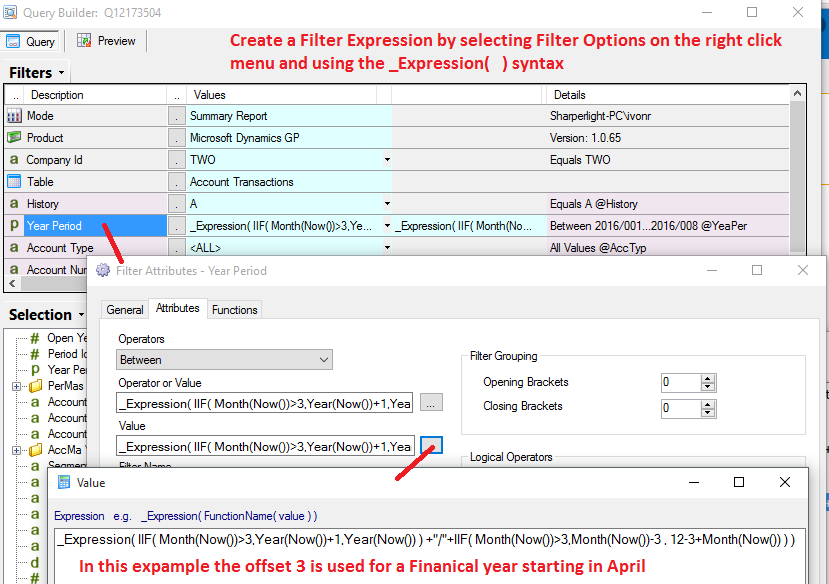
Query Filter values can be based on Expressions that calculate the value based on the date functions for example, simular in the way that output Expressions are created. In the example below can be copied and padded into the Filter value and it will return the current finiancial period where the start of the finanical year is April. If your finanical year started in July you would replace the 3 in the expression with 6.
Current Financial Period
_Expression( IIF( Month(Now())>3,Year(Now())+1,Year(Now()) ) +”/”+IIF( Month(Now())>3,Month(Now())-3 , 12-3+Month(Now()) ) )
This expression above will return 2016/8 when the date is November 2015 and 2016/1 when it’s April 2015.
Start of Financial Year
_Expression( IIF( Month(Now())>3,Year(Now())+1,Year(Now()) ) +”/01″ )
This expression above will return 2016/1 when the date is November 2015 and 2016/1 when it’s April 2015.
Note: In version 3.1.22 onwards there is a new Expression Function called PeriodFinancial that makes this simpler where you provide the date and starting month offset where April is 4. It also has other options for start and end of year and adding years and periods
Current Financial Period
_Expression( PeriodFinancial( Now(),4) )
Start of Financial Year
_Expression( PeriodFinancial( Now(),4,”start”) )
_Expression( PeriodFinancial( Now(),4,”start”,-1) )
_Expression( PeriodFinancial( Now(),4,””,0,-1) )
Date Fields using Lookup
When filtering on dates for a Report you may want to have dates appear in the report based on a Financial period where the start of the Financial Year is not January but July for example. This would mean that if the current date is the 15th of March 2014 the start of the financial year would be the 1 July 2013. Note that year is 2013 not 2014. If the current date was the 15th of July 2014 then the start of the Financial Year would be the 1 July 2014.
In the Date Options Lookup select Start of Financial Year – Before Offsets and depending on your Financial Month set the Months offset spinner. In this example the Month offset is set to 6

The same lookup but when the current date is the 15th July 2014

In the Query Builder you can see the filter value is DATE 6m ofs for example. In this case ofs mean Offset Financial Year Start and the 6m means a offset of 6 months.
