Query Google YouTube API to get Video playlist in JSON format
The Query Builder would normally retrieve data from a Database via the Datamodel, however it is possible to query HTML Web Pages and also RESTful service like Google API for example. The System Product in Query Builder contains a Table called Web Page Table which is designed to read Web based content and automatically determine the data being returned. If the data is HTLM then it will look for a table or list content and when JSON it will parse the JSON data.
In this example we will call the Google API for YouTube to return all the videos in a playlist. Google requires that you register for a Developer API KEY when calling their API so this will need to be done and your API KEY entered into this example before results can be returned.
Download Example – Unzip and Import into Publisher
Sample Report Showing Videos for a YouTube Channel Playlist

Query Builder – System – Web Page Table
The Web Page Table will take any URL address and will try and detect the type of data returned. In this case it will be JSON data. To help the parsing of the JSON into an array use the Position Start to identity the array name used in the results. In this case the Cache Data for (n) Minutes is used to case the data for 60 minutes to improve query performance.

Google YouTube API
The URL Link that is issued during the Query is as follows
https://www.googleapis.com/youtube/v3/playlistItems?part=snippet&maxResults=50&playlistId={@staging-sharperlight-com.stackstaging.comPlayListID}&key={@staging-sharperlight-com.stackstaging.comAPIKEY}
where {@staging-sharperlight-com.stackstaging.comPlayListID} and {@staging-sharperlight-com.stackstaging.comAPIKEY} are references to the two prompt only filters above the URL Link filter. In this example the Playlist ID is the Sharperlight Web Channel playlist
| PLtjVcnwtWXjHWC1klKMFBfI5pmTO7bSSx |
Register here for a Google API KEY and view the API documentation here
Raw JSON results from Query
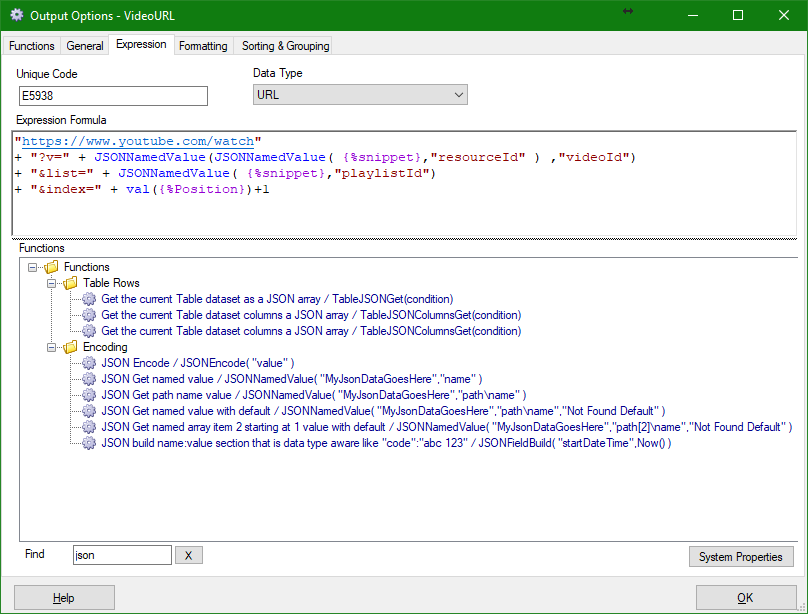
The Query Builder filter called Start Position is used to tell the Query Builder if their is a array present or not and what it’s name is. In this example it is items. The main fields under the array Item are then displayed as fields in the selection list. If you need to get a value instead one of their fields then you can use the Expression function called
JSONNameValue( {%outputFieldName} , “JSONName” )
When the value is down more than one level nest the function like so
JSONNameValue(JSONNameValue( {%outputFieldName} , “JSONNameLevel1″ ) ,”JSONNameLevel2”)

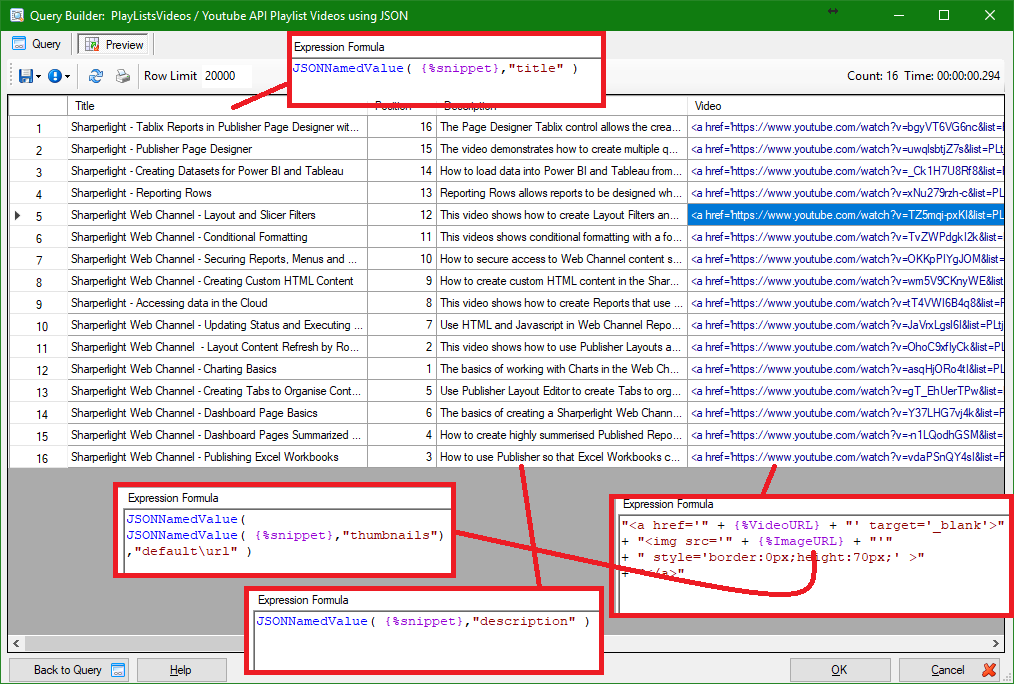
Query Builder Results
JSON Functions