
KENDO Grid control – Definition
Introduction
The post “KENDO Grid Control” explains the summarised information.
In this post, I will explain how we can define KENDO Grid control.
Details
The sample code is shown below. (See the full code in the post “KENDO Grid control“)
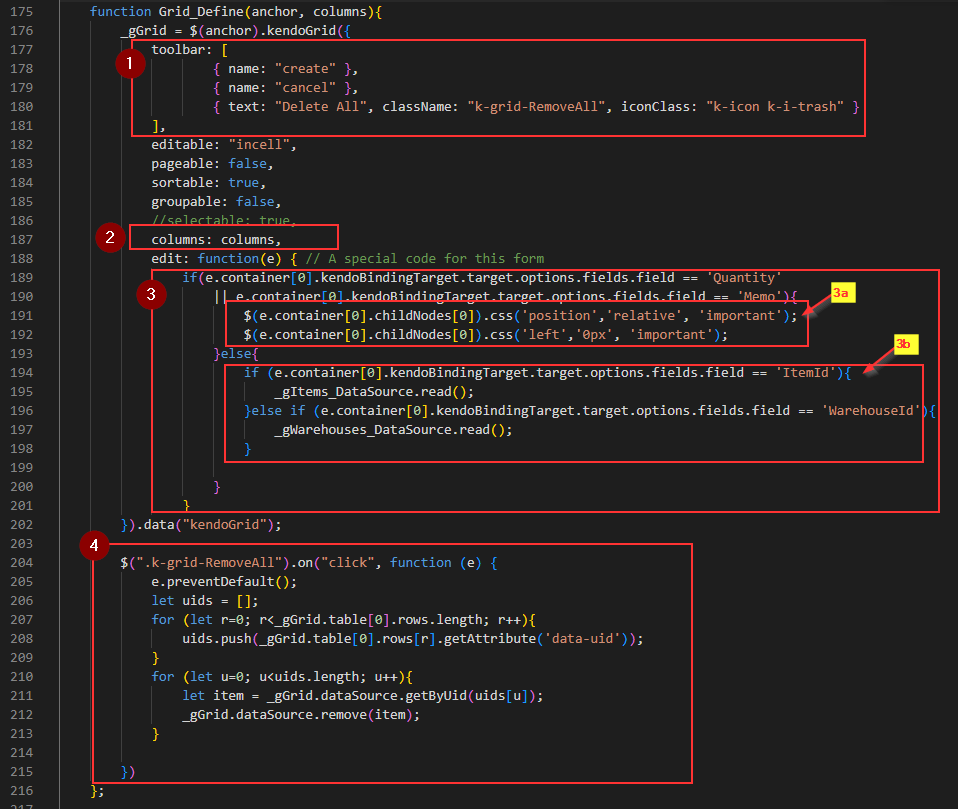
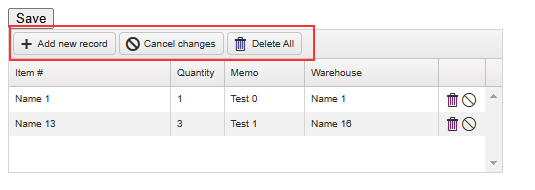
1) This part creates the toolbar above the KENDO Grid. ‘Add new record’ and ‘Cancel changes’ are standard KENDO toolbar items, while ‘Delete All’ is a custom item.
2) This is the column definition for the grid. It is defined using another function in this example, which is explained in this post ‘KENDO Grid control – Columns’.
3) This is the function that is called when the grid enters edit mode.
3a) This part is executed when the ‘Quantity’ or ‘Memo’ cell enters edit mode. However, we can ignore this in this example.
3b) This part is executed when the ‘Items’ or ‘Warehouses’ cell enters edit mode, and it refreshes the DataSource for their DropDownList controls.
4) This is the function for the custom toolbar item ‘Delete All,’ which performs a soft-delete for all grid records. When the ‘Cancel changes’ button is clicked, all records are restored.
Afterword
This shows what I created and you can find out what we can do with KENDO Grid control with their web publications here.