
KENDO Grid control
Introduction
The KENDO JavaScript library is bundled with Sharperlight and provides a variety of web UI controls that can be combined with Sharperlight published reports to create various web interfaces. In this post, I will focus on using the kendoGrid control.
Additionally, the jQuery library is also bundled with Sharperlight.
There are three things to prepare:
- The HTML code (including JavaScript) in which the kendoGrid control is defined.
- A published report that acts as a container for the HTML code.
- Some published reports that provide datasets to the kendoGrid and other controls.
Practices
HTML code (including JavaScript code)
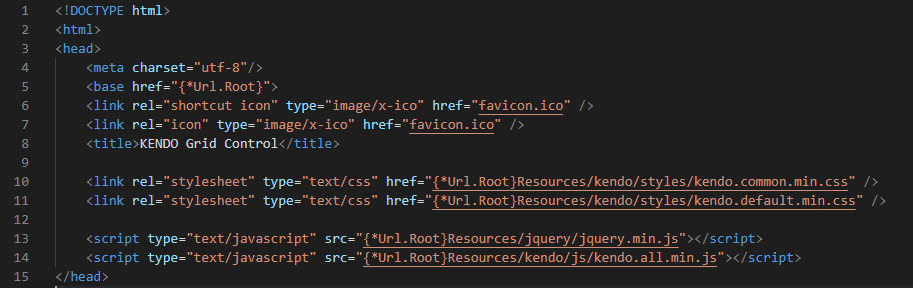
Header
The reference to the Kendo JavaScript library and CSS styles are defined in the header section of the HTML code.
The specific Sharperlight tag “{*Url.Root}” is used and is replaced with the actual Sharperlight service URL at runtime.
Body
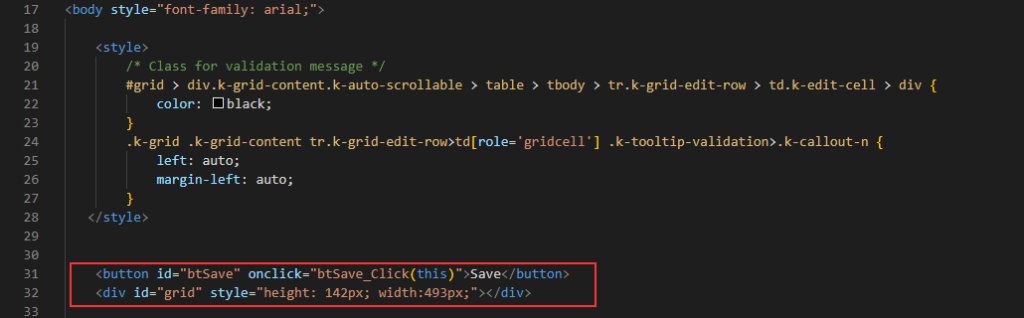
This is where Save button and KENDO Grid control is created.
JavaScript
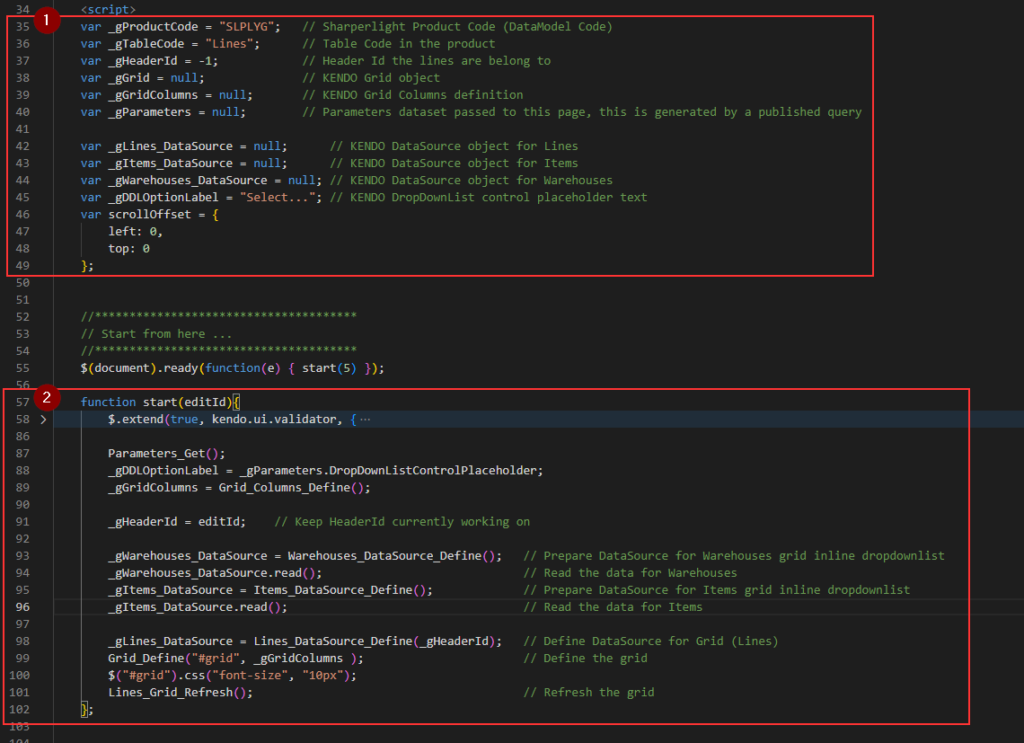
The global variables are defined first (1), and the code for what it should do when the page is loaded is defined here (2).
It is doing that:
- Get the parameters defined with a published report for the use in this page – See “KENDO Grid control – Sharperlight DataSource” for more details
- Define the columns for the grid – See “KENDO Grid control – Columns” for more details
- Keep the header ID in a global variable
- Define the KENDO DataSource object for the grid’s inline DropDownList control for warehouses – See “KENDO Grid control – KENDO DataSource” for more details
- Read data for Warehouse DataSource
- Define the KENDO DataSource object for the grid’s inline DropDownList control for items – See “KENDO Grid control – KENDO DataSource” for more details
- Read data for Item DataSource
- Define the KENDO DataSource object for the lines displayed in the grid – See “KENDO Grid control – KENDO DataSource” for more details
- Configure the KENDO Grid – See “KENDO Grid control – Definition” for more details
- Adjust the font size for the grid control
- Refresh data for the grid
Other things need to know are:
- Validation – See “KENDO Grid control – Validation” for more details
- Deleted Item – See “KENDO Grid control – Where are the deleted records?” for more details
The details of the functions shown above will be explained with the other posts.
Importing the HTML as a resource
Create a published report that works as a container for the custom HTML.
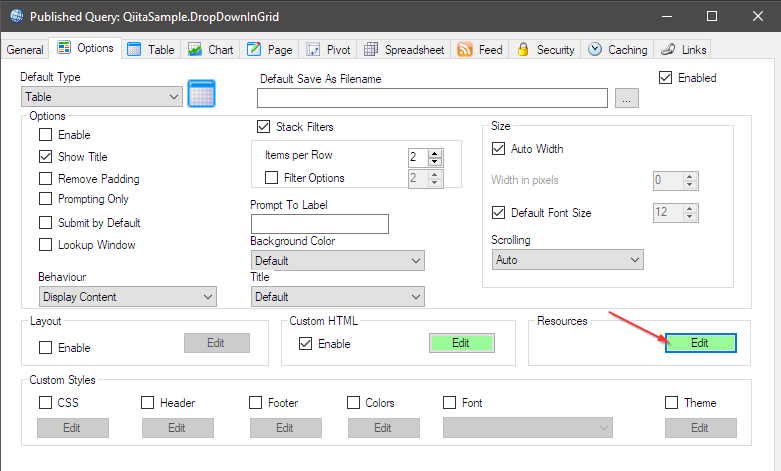
Go to the Options tab, open the Resources editor, and then add the custom HTML by specifying its file path.
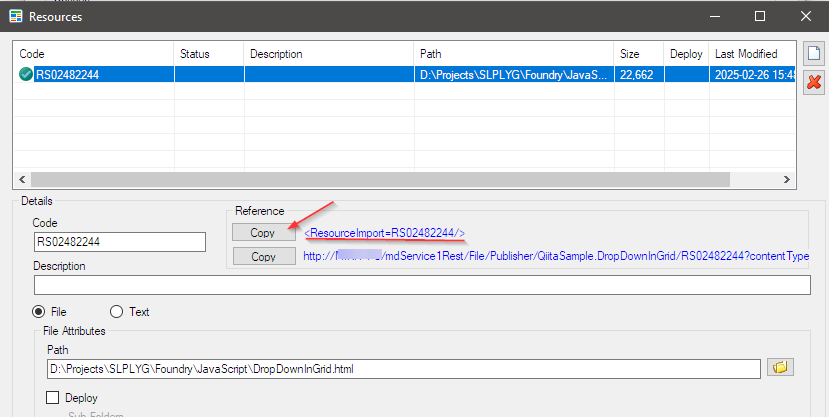
Copy the reference code using the Copy button, then close the editor.
Open the Custom HTML editor on the Options tab and paste the copied reference code.
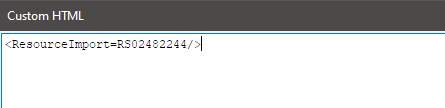
OK to save it, and OK to save the published report as well.
Published Reports for DataSources
Three published reports are required to feed data to the KENDO DataSources.
They are for Lines, Warehouses and Items.
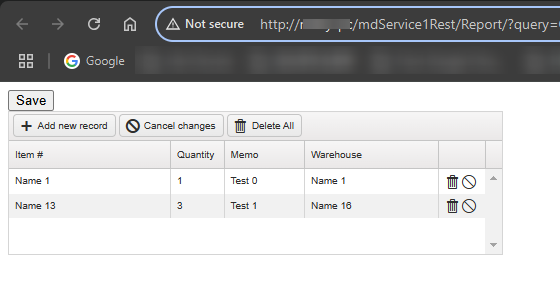
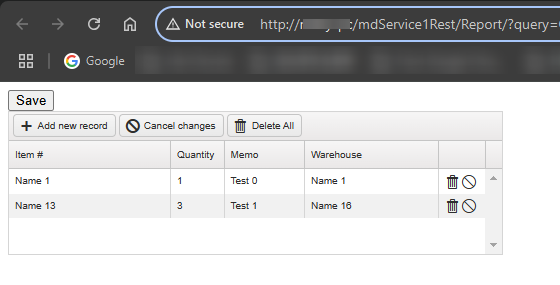
Once all the requirements are in place, it will look like this when opened in a browser.
Afterwords
The extensibility of Sharperlight allows for the creation of comprehensive web applications. The data access layer can be designed using the query builder, eliminating the need to write SQL statements and making maintenance easier. This also enables developers to focus on UI design. In any case, try combining Sharperlight published reports (queries) with KENDO UI controls to create a variety of interactive reports.
Full Code (No error trap has not been written)
<!DOCTYPE html>
<html>
<head>
<meta charset="utf-8"/>
<base href="{*Url.Root}">
<link rel="shortcut icon" type="image/x-ico" href="favicon.ico" />
<link rel="icon" type="image/x-ico" href="favicon.ico" />
<title>KENDO Grid Control</title>
<link rel="stylesheet" type="text/css" href="{*Url.Root}Resources/kendo/styles/kendo.common.min.css" />
<link rel="stylesheet" type="text/css" href="{*Url.Root}Resources/kendo/styles/kendo.default.min.css" />
<script type="text/javascript" src="{*Url.Root}Resources/jquery/jquery.min.js"></script>
<script type="text/javascript" src="{*Url.Root}Resources/kendo/js/kendo.all.min.js"></script>
</head>
<body style="font-family: arial;">
<style>
/* Class for validation message */
#grid > div.k-grid-content.k-auto-scrollable > table > tbody > tr.k-grid-edit-row > td.k-edit-cell > div {
color: black;
}
.k-grid .k-grid-content tr.k-grid-edit-row>td[role='gridcell'] .k-tooltip-validation>.k-callout-n {
left: auto;
margin-left: auto;
}
</style>
<button id="btSave" onclick="btSave_Click(this)">Save</button>
<div id="grid" style="height: 142px; width:493px;"></div>
<script>
var _gProductCode = "SLPLYG"; // Sharperlight Product Code (DataModel Code)
var _gTableCode = "Lines"; // Table Code in the product
var _gHeaderId = -1; // Header Id the lines are belong to
var _gGrid = null; // KENDO Grid object
var _gGridColumns = null; // KENDO Grid Columns definition
var _gParameters = null; // Parameters dataset passed to this page, this is generated by a published query
var _gLines_DataSource = null; // KENDO DataSource object for Lines
var _gItems_DataSource = null; // KENDO DataSource object for Items
var _gWarehouses_DataSource = null; // KENDO DataSource object for Warehouses
var scrollOffset = {
left: 0,
top: 0
};
//**************************************
// Start from here ...
//**************************************
$(document).ready(function(e) { start(5) });
function start(editId){
$.extend(true, kendo.ui.validator, {
messages: { //custom rules messages
required: function (input) {
if(input.is('[name="ItemId"]')){
return "Please select an Item";
}else if(input.is('[name="WarehouseId"]')){
return "Please select a Warehouse";
}
},
customRule1: function (input) {
if(input.is('[name="Quantity"]')){
return "Quantity shouldn't be over 5";
}else if (input.is('[name="Memo"]')){
return "Memo shouldn't be over 20 chars";
}
}
},
rules: {
customRule1: function(input){
if(input.is('[name="Quantity"]')){
return input.val() <= 5;
}else if (input.is('[name="Memo"]')){
return input.val().length <= 20;
}
return true;
}
}
});
Parameters_Get();
_gGridColumns = Grid_Columns_Define();
_gHeaderId = editId; // Keep HeaderId currently working on
_gWarehouses_DataSource = Warehouses_DataSource_Define(); // Prepare DataSource for Warehouses grid inline dropdownlist
_gWarehouses_DataSource.read(); // Read the data for Warehouses
_gItems_DataSource = Items_DataSource_Define(); // Prepare DataSource for Items grid inline dropdownlist
_gItems_DataSource.read(); // Read the data for Items
_gLines_DataSource = Lines_DataSource_Define(_gHeaderId); // Define DataSource for Grid (Lines)
Grid_Define("#grid", _gGridColumns ); // Define the grid
$("#grid").css("font-size", "10px");
Lines_Grid_Refresh(); // Refresh the grid
};
function Parameters_Get() {
let url = "{_rootURL}DataSource/?query=" + _gProductCode + "_DAT.Parameters"
+ "&usid={_System.Rest.Usid}"
+ "&dfmt=json&dcat=UseNames";
$.getJSON({
url: url,
async: false,
//type: 'GET',
format: 'json',
'success': function(data) {
_gParameters = data;
},
'error': function(jqXHR, textStatus, errorThrown) {
console.log(jqXHR.status+", " + jqXHR.statusText+", "+textStatus+", "+errorThrown);
}
});
};
function Grid_Columns_Define(){
let xCols = [{
field: "ItemId",
title: "Item #",
width: 120,
template: "#=ItemName_Get(ItemId) #",
editor: ItemNameDropDownEditor
}, {
field: "Quantity",
title: "Quantity",
width: 40,
type: "number"
}, {
field: "Memo",
title: "Memo",
width: 60
}, {
field: "WarehouseId",
title: "Warehouse",
width: 100,
template: "#=WarehouseName_Get(WarehouseId) #",
editor: WarehouseNameDropDownEditor
}, {
command: [{
name: "Remove",
template: "<span name='deleteIcon' class='k-icon k-i-trash' onclick='GridRow_Delete(this)' \
title='" + _gParameters.GridRowRemoveIconTooltip + "' style='cursor: pointer;'></span>"
},{
name: "Cancel",
template: "<span name='cancelIcon' class='k-icon k-i-cancel-outline' onclick='GridRow_Cancel(this)' \
title='" + _gParameters.GridRowCancelIconTooltip + "' style='cursor: pointer;'></span>"
}]
,width: 35
}];
return xCols
};
function Grid_Define(anchor, columns){
_gGrid = $(anchor).kendoGrid({
toolbar: [
{ name: "create" },
{ name: "cancel" },
{ text: "Delete All", className: "k-grid-RemoveAll", iconClass: "k-icon k-i-trash" }
],
editable: "incell",
pageable: false,
sortable: true,
groupable: false,
//selectable: true,
columns: columns,
edit: function(e) { // A special code for this form
if(e.container[0].kendoBindingTarget.target.options.fields.field == 'Quantity'
|| e.container[0].kendoBindingTarget.target.options.fields.field == 'Memo'){
$(e.container[0].childNodes[0]).css('position','relative', 'important');
$(e.container[0].childNodes[0]).css('left','0px', 'important');
}else{
if (e.container[0].kendoBindingTarget.target.options.fields.field == 'ItemId'){
_gItems_DataSource.read();
}else if (e.container[0].kendoBindingTarget.target.options.fields.field == 'WarehouseId'){
_gWarehouses_DataSource.read();
}
}
}
}).data("kendoGrid");
$(".k-grid-RemoveAll").on("click", function (e) {
e.preventDefault();
let uids = [];
for (let r=0; r<_gGrid.table[0].rows.length; r++){
uids.push(_gGrid.table[0].rows[r].getAttribute('data-uid'));
}
for (let u=0; u<uids.length; u++){
let item = _gGrid.dataSource.getByUid(uids[u]);
_gGrid.dataSource.remove(item);
}
})
};
function GridRow_Cancel(e) {
let row = e.parentElement.closest('tr');
var uid = $(row).data(uid);
dataSource = _gGrid.dataSource;
let item = dataSource.getByUid(uid.uid);
dataSource.cancelChanges(item);
let container = _gGrid.wrapper.children(".k-grid-content"); // or ".k-virtual-scrollable-wrap"
scrollOffset.left = container.scrollLeft();
scrollOffset.top = container.scrollTop();
_gGrid.refresh();
};
function GridRow_Delete(e){
$(e).removeClass('k-i-trash').addClass('k-i-x');
let row = e.parentElement.closest('tr');
var uid = $(row).data(uid);
dataSource = _gGrid.dataSource;
let item = dataSource.getByUid(uid.uid);
dataSource.remove(item);
//$('tr[data-uid="' + uid.uid + '"]').css("background-color", "#D283A7");
//$('tr[data-uid="' + uid.uid + '"]').attr('data-deleted', 'true');
}
//**************************************
// DataSource Constructions
//**************************************
function Warehouses_DataSource_Define(){
let xUrl = "{_rootURL}DataSource/?query=" + _gProductCode + "_DAT.Warehouses"
+ "&usid={_System.Rest.Usid}"
+ "&dfmt=jsonarray&dcat=UseNames";
let xDs = new kendo.data.DataSource({
transport: {
read: {
async: false,
cache: false, // This is important to make request every time
datatype: "jsonp",
url: xUrl
}
},
schema: {
model: {
id: "WarehouseId",
fields: {
WarehouseId: { type: "number" },
WarehouseCode: { type: "string" },
WarehouseName: { type: "string" }
}
}
}
});
return xDs;
};
function Items_DataSource_Define(){
let xUrl = "{_rootURL}DataSource/?query=" + _gProductCode + "_DAT.Items"
+ "&usid={_System.Rest.Usid}" //{_System.Rest.Usid}"
+ "&dfmt=jsonarray&dcat=UseNames";
let xDs = new kendo.data.DataSource({
//autoSync: false,
transport: {
read: {
async: false,
cache: false, // This is important to make request every time
datatype: "jsonp",
url: xUrl
}
},
schema: {
model: {
id: "ItemId",
fields: {
ItemId: { type: "number" },
ItemCode: { type: "string" },
ItemName: { type: "string" },
ItemDescription:{ type: "string" },
ItemUnitPrice: { type: "number" }
}
}
}
});
return xDs;
};
function Lines_DataSource_Define(editId){
let xUrl = "{_rootURL}DataSource/?query=" + _gProductCode + "_DAT.Lines"
+ "&usid={_System.Rest.Usid}" //{_System.Rest.Usid}"
+ "&fltHeaderId=" + encodeURIComponent(editId)
+ "&dfmt=jsonarray&dcat=UseNames";
let xDs = new kendo.data.DataSource({
transport: {
read: {
cache: false, // This is important to make request every time
datatype: "jsonp",
url: xUrl
}
},
schema: {
model: {
id: "Id",
fields: {
LineNo: { type: "string" },
ItemId: { type: "number" },
ItemCode: { type: "string" },
ItemName: { type: "string" },
Quantity: { type: "number" },
Memo: { type: "string" },
WarehouseId: { type: "number" },
WarehouseCode: { type: "string" },
WarehouseName: { type: "string" },
HeaderId: { type: "number" }
}
}
}
});
return xDs;
};
//**************************************
// Read DataSources
//**************************************
function Lines_Grid_Refresh(){
// Read data
_gLines_DataSource.read().then(function () {
_gGrid.setDataSource(_gLines_DataSource);
_gGrid.refresh();
});
};
//**************************************
// Editor events - DropDownList
//**************************************
function ItemNameDropDownEditor(container, options) {
let models = _gItems_DataSource.data();
let message = $('<span class="k-invalid-msg" data-for="ItemId"></span>');
let input = "";
if(models.length === 0){
input = $('<input id="ItemId" name="ItemId" data-bind="value:' + options.field + '"/>');
}else{
input = $('<input id="ItemId" name="ItemId" required data-bind="value:' + options.field + '"/>');
}
//var parent = $(container).parent();
input.appendTo(container);
message.appendTo(container); // message must be appened after input being appened for the right validation message position
input.kendoDropDownList({
dataTextField: "ItemName",
dataValueField: "ItemId",
dataSource: _gItems_DataSource,
optionLabel: _gParameters.DropDownListControlPlaceholder
});
};
function WarehouseNameDropDownEditor(container, options) {
let models = _gWarehouses_DataSource.data();
let message = $('<span class="k-invalid-msg" data-for="WarehouseId"></span>');
let input = "";
if(models.length === 0){
input = $('<input id="WarehouseId" name="WarehouseId" data-bind="value:' + options.field + '"/>');
}else{
input = $('<input id="WarehouseId" name="WarehouseId" required data-bind="value:' + options.field + '"/>');
}
//var parent = $(container).parent();
input.appendTo(container);
message.appendTo(container); // message must be appened after input being appened for the right validation message position
input.kendoDropDownList({
dataTextField: "WarehouseName",
dataValueField: "WarehouseId",
dataSource: _gWarehouses_DataSource,
optionLabel: _gParameters.DropDownListControlPlaceholder
});
};
//**************************************
// Grid Template Functions
//**************************************
function ItemName_Get(xId){
var xData = _gItems_DataSource.data();
for(let i=0; i<xData.length; i++){
if(xData[i].ItemId === xId){
return xData[i].ItemName;
}
}
return _gParameters.DropDownListControlPlaceholder;
};
function WarehouseName_Get(xId){
var xData = _gWarehouses_DataSource.data();
for(let i=0; i<xData.length; i++){
if(xData[i].WarehouseId === xId){
return xData[i].WarehouseName;
}
}
return _gParameters.DropDownListControlPlaceholder;
};
//**************************************
// Events (Save)
//**************************************
function btSave_Click(e){
var recs = _gGrid.dataSource.data();
var dest = _gGrid.dataSource.destroyed();
for (var r=0; r<recs.length; r++){
alert("Rec: " + (r+1)
+ '\nItem ID: ' + recs[r].ItemId
+ '\nQty: ' + recs[r].Quantity
+ '\nMemo: ' + recs[r].Memo
+ '\nWarehouse ID: ' + recs[r].WarehouseId
+ '\nJumbo ID: ' + _gHeaderId
+ '\nuid: ' + recs[r].uid
);
}
Database_Save(recs, false); // Update
for (var d=0; d<dest.length; d++){
alert("This rec will be deleted: : " + (d+1)
+ '\nItem ID: ' + dest[d].ItemId
+ '\nQty: ' + dest[d].Quantity
+ '\nMemo: ' + dest[d].Memo
+ '\nWarehouse ID: ' + dest[d].WarehouseId
+ '\nJumbo ID: ' + _gHeaderId
+ '\nuid: ' + dest[d].uid
);
}
Database_Save(dest, true); // Delete
};
//**************************************
// functions for saving data
//**************************************
function Database_Save(recs, isDelete) {
try{
let postData = "";
for(r=0;r<recs.length;r++){
let d = ""
+ (r==0 ? "wbBatchMode=" : "&wbBatchMode=") + (r+1).toString()
+ "&ipc:/Row_ID=" + encodeURIComponent( recs[r].Id )
+ "&ipc:/LineNo=" + encodeURIComponent( recs[r].LineNo )
+ "&ipc:/Items/Code=" + encodeURIComponent( ItemCode_Find(recs[r].ItemId) )
+ "&ipc:/Quantity=" + encodeURIComponent( recs[r].Quantity )
+ "&ipc:/Memo=" + encodeURIComponent( recs[r].Memo )
+ "&ipc:/Warehouses/Code=" + encodeURIComponent( WarehouseCode_Find(recs[r].WarehouseId) )
+ "&ipc:/Header_ID=" + encodeURIComponent( _gHeaderId )
postData = postData + d;
}
console.log("Post Parameter: " + postData);
postData = postData.replace(/null/g, "");
Records_Submit(postData, isDelete);
}catch (err){
console.log('Errors on Database_Save(): ' + err.message);
}
};
function Records_Submit(parameters, isDelete){
if (parameters == "") return;
let sURL = "";
if (!isDelete){
sURL ="{_rootURL}EntryFormPost/?productcode="+ _gProductCode + "&tablecode="+ _gTableCode + "&usid={_System.Rest.Usid}";
}else{
sURL ="{_rootURL}EntryFormPost/?productcode="+ _gProductCode + "&tablecode="+ _gTableCode + "&usid={_System.Rest.Usid}" + "&options=Delete";
}
$.ajax({
url: sURL,
type: 'POST',
async: false,
contentType: 'text/plain',
data: parameters,
success: function (response) {
if (response.errorMessage != null) {
if (!isDelete){
alert("Save (UPDATE) Error: " + response.errorMessage);
}else{
alert("Save (DELETE) Error: " + errorMessage);
}
}else{
if (!isDelete){
alert("Updated Successfully!!");
}else{
alert("Deleted Successfully!!");
}
}
},
error: function (xhr, status, error) {
if (!isDelete){
alert("Save (UPDATE) Error: " + error);
}else{
alert("Save (DELETE) Error: " + errorMessage);
}
}
});
};
function WarehouseCode_Find(Id){
let data = _gWarehouses_DataSource.data();
for(let d=0; d<data.length; d++){
if (data[d].WarehouseId === Id){
return data[d].WarehouseCode;
}
}
return "";
};
function ItemCode_Find(Id){
let data = _gItems_DataSource.data();
for(let d=0; d<data.length; d++){
if (data[d].ItemId === Id){
return data[d].ItemCode;
}
}
return "";
};
</script>
</body>
</html>