
Expression: IsNumeric
Introduction
As the name suggests, this function determines whether the value of the field being examined is numeric.
Practices
Query Definition
A simple query is here with a custom defined dataset.
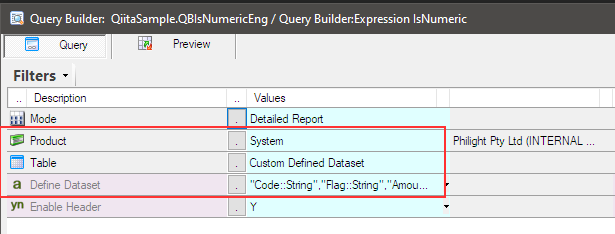
The custom defined dataset is like this.
"Code::String","Flag::String","Amount::Number"
"A100","a1",1234.55
"A200","a2",6789.00
"A300","11",234.55
"A400","12",789.00
"A500","13",23.44
"B100","b1",1234.55
"B200","b2",6789.00
"B300","31",234.55
"B400","32",789.00
"B500","33",23.44
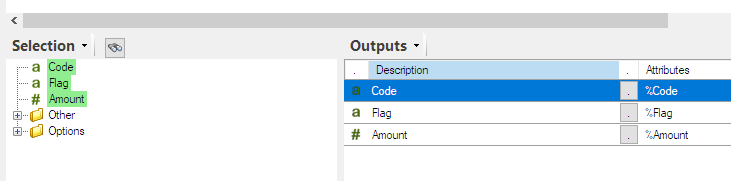
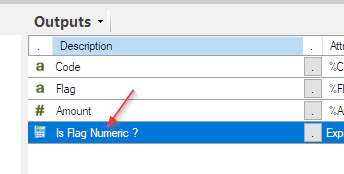
The output items are also like this.
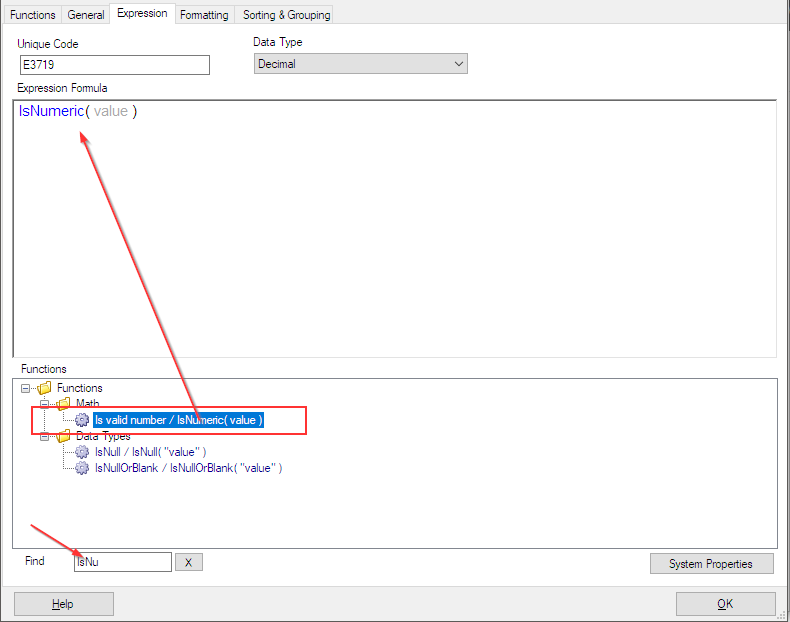
Add IsNumeric function
Add an expression and search the template for the IsNumeric function by typing ‘IsNum’ into the Find text field, and double-click it to show the template in Expression Formula text area.
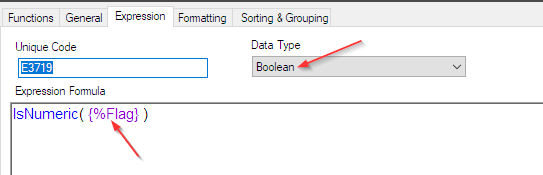
Set the reference tag ‘{%Flag}‘ for the Flag column as the argument of the IsNumeric function and choose ‘Boolean‘ for the Data Type.
Click OK to save the expression and edit its description to ‘Is Flag Numeric ?’.
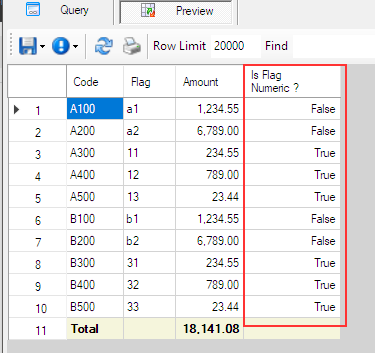
Now for the preview! The expression tells you whether the value in the Flag column is numeric or not.
Afterword
I hope this helps with your work.
Back to Expressions.