
Vendor Issued Licenses System
Partners can register with Sharperlight to gain more control over their client licenses through the use of the online License Registration System. Client licenses can be created, changed and renewed in real-time by calling a simple Sharperlight REST API or Data Entry Form built into each client installation instance. For example, a client may already have a license for three named users and they wish to increase the number to five users. The partner can via a dashboard, entry form or some other integration layer, adjust the assigned users and have the new license applied in real-time to reflect the client’s subscription request. A similar process would occur for issuing new licenses or handling downgrades. The client will be able to immediately use the license without restarting the Sharperlight Windows Service. This system is best suited for partners that are hosting multiple clients that are on monthly subscriptions.
Generally, partners would integrate this license process so that licenses are auto renewed every month or year depending on the agreement with Sharperlight. All license changes are automatically registered with Sharperlight so that billing can be reconciled with the partners records. This means that many clients can be processed in one bulk payment instead of detailing each individual client as separate payments. The goal is to reduce the management overhead and improve the speed at which licenses can be issued, renewed and changed.
REST API
The Sharperlight REST API enables real-time license changes, but this first requires the partner email support@sharperlight.com at Sharperlight to obtain an API Key. The API Key determines the licensing rules such as how many days the license is valid for, e.g., 30 or 365 days and if auto renewals occur or not. The REST API is simple to use and functions by calling a unique URL address that is associated with each Clients Sharperlight instance using a GET or POST method. The REST API responses with all the details of the new license, including any errors in JSON format. The API does require internet access over https port 443 so that the API Key may be validated and the new license registered in the Online Sharperlight License System. Only license related data like the Site Code, Expiry date and User Counts are communicated back to Sharperlight. Details such as what user accounts are assigned to the license are not communicated back for privacy reasons.
Web Channel – Data Entry Form
As an alternative to creating an integration layer to call the REST API there a simpler approach where Sharperlight has a Browser Data Entry Form called “License – Vendor Issued”. The Forms can be found on the Web Channel main index page under the License menu but it will require admin rights to access. Using the Data Entry From an admin user can simply enter their API Key and other details create new or edit existing licenses. The form does all the required validation and if the details are correct the license is deployed immediately.
Vendor Issued License Entry Form

Vendor Issued License Entry Form
Functionally
- Create new licenses in real-time both demo and sales
- Modify existing licenses in real-time
- Handles both Concurrent and Named Users.
- The API Key determines the basic rules for license changes like the number of days
- License expiry dates are restricted by the API Key setup.
- License will auto renewal depending on the API Key setup.
- Call a simple REST API URL address using a GET or POST method
- Just the minimal settings can be passed when calling the REST API as many fields have default logic.
- License changes and rules are validated and auto registered with the Sharperlight Online License System.
- License changes are reflected in real-time without a restart of the Sharperlight Window Service
- License that are set for auto-renewal, will automatically renew two days before expiring.
Prerequisites
- Version 6.0.0 or higher
- Partner API Key (Obtained from Sharperlight which is linked to your Vendor code)
- Internet Access on port 443 (https SSL)
Compliance
- Do not use spaces or special character in Vendor or Site Codes (only use – or _ when needed)
- Do not keep extending demo licenses or the Site Code will be locked out.
- Remember that licenses that are not demos are a sale and will be billed.
- Be aware of license pricing when setting the User Counts and License Type (Named / Concurrent)
- API Keys are linked to your vendor code and should kept secret and not be shared.
- All license changes are registered with Sharperlight for billing and compliance purposes.
- If you think your API Keys has been compromised, contact Sharperlight to have it revoked.
- The API Key terms like number of days, renewals and demos are determined when making a request
- If the same license is deployed in multiple locations, it will be flagged in audit reporting. These will require some feedback on the reason or it may be revoked.
Create new Named User License using REST API URL GET method
This example shows how to create a new license for 1 Full User and 3 Web users for a client named Client ABC.
The Named User admin takes the full license and guest, user2 and user3 are allocated as Web only users. Because the named users are specified the license type is automatically set to Named and the User Counts are also automatically set based on the number of users listed. Note the named Users need to already exist in Site Setup otherwise a error will be raised detailing the invalid users.
Noticed the Site Code was not specified and therefore it was auto generated, prefixed with the Vendor Code associated with the API Key. In this case the Vendor associated with the API Key is REDRIBBON so the Site Code ends up being REDRIBBON:0B5CBA8D. If you need to assign you own Site Code use the URL parameter &siteCode={YourVendorCode}:{YourSideCode} while avoiding special characters and spaces. The URL parameters that can be set, closely match the JSON names. For example, setting the expiry date would be &expiryDate={yyyy-mm-dd} and Full User Count would be &fullUserCount=2. Remember to URL encode parameters to protect special characters when present.
Notice that just the bare minimum information can be provided to generate a License Key and if not enough or invalid data is set the “errorMessage”: “” will contain an error number and details on what went wrong.
GET Method
https://yourServer/mdService1Rest/SystemLicenseUpdate?apiKey=99999-999-9999-FEED&fullUserNamedList=admin&webUserNamedList=guest;user2;user3&SiteName=Client%20A&VendorSiteCode=V1234
ERROR RESPONSE
{
   "errorMessage": "304: Invalid API Key '99999-999-9999-FEED' contact support@sharperlight.com",
   "message": "",
....
}


{
   "errorMessage": "541: The Vendor Site Code must be set when using this API Key",
   "message": "",
....
}
OK RESPONSE
{
  "errorMessage": "",
  "message": "100: Need at least one Full User license (Auto set)",
  "license": {
    "api": {
      "key": "99999-999-9999-FEED",
      "vendorCode": "REDRIBBON",
      "vendorName": "Red Ribbon Pty Ltd",
      "maxDays": 30,
      "maxDaysDemo": 7,
      "isLocked": false,
      "isTest": false,
      "isDelete": false,
      "allowAutoRenewal": true,
      "allowStartDate": true,
      "requireVendorSiteCode": true,
      "featuresKeyDefault": "[DM=************,MQSYSDM]"
    },
    "site": {
      "code": "REDRIBBON:0B5CBA8D",
      "name": "Client A"
    },
    "vendor": {
      "code": "REDRIBBON",
      "name": "Red Ribbon Pty Ltd",
      "contact": "",
      "email": "",
      "siteCode": "V4567"
    },
    "featureKey": "[DM=********,MQSYSDM][AutoRenew=30][VendorSiteCode=V4567]",
    "referenceCode": "",
    "startDate": "0001-01-01T00:00:00",
    "expiryDate": "2021-10-21T00:00:00+08:00",
    "autoRenewalOverride": "DEFAULT",
    "isDemo": false,
    "scheduler": false,
    "licenseType": "Named_Users",
    "licenseKey": "*********VZV",
    "full": {
      "userCount": 1,
      "userNamedList": "admin"
    },
    "web": {
      "userCount": 3,
      "userNamedList": "guest; user2; user3"
    },
    "other": ""
  }
}

Site Setup - License Details
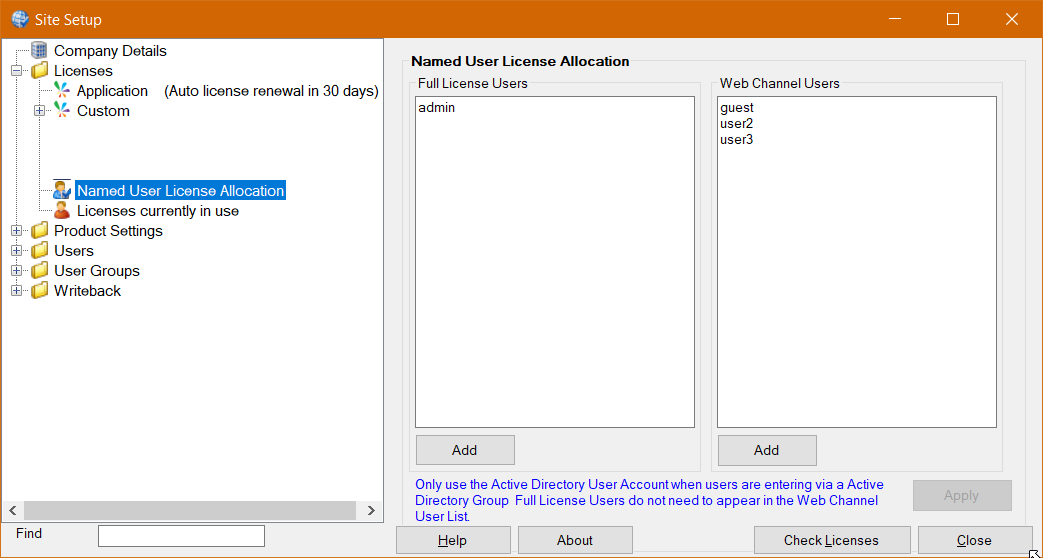
Site Setup - Named User Allocation
REST API GET Parameters
| URL Parameter | Description | Mandatory | Example |
| apiKey | Vendor API Key | Yes | &apiKey=1222…FEED |
| siteCode | Site Code / Will auto assign if blank or use existing one | No | &siteCode=MEGA |
| siteName | Site Name | No | &siteName=Mega Pty Ltd |
| vendorCode | Vendor Code is linked to the API Key | No | &vendorCode=REDRIBBON |
| vendorName | Vendor Name | No | &vendorName=RedRibbon |
| vendorContact | Vendor Contact | No | &vendorContract=support |
| vendorEmail | Vendor Email | No | &vendorContact=support@x.com |
| vendorSiteCode | Vendor Site Code which may be different from the Sharperlight Site Code | API Key driven | &vendorSiteCode=V1234 |
| referenceCode | Vendor Reference Code e.g., PO no. | No | &referenceCode=PO1234 |
| featureKey | Features Key | No | &featuresKey=%5BDM%3DSalesForece%5D |
| licenseType | Named_Users or Conncurrent_Users (Default is named) | No | &licenseType=Named_Users |
| fullUserCount | Full user license count (All applications and Web) | Yes | &fullUserCount=1 |
| fullUserNamedList | Named Full user list separated by ; | No | &fullUserNamedList=admin%3Bguest |
| webUserCount | Web Channel user license count | No | &webUserCount=5 |
| webUserNamedList | Named Web user list separated by ; | No | &webUserNamedList=sales%3Baccounts |
| expiryDate | When left blank the license expiry is driven by the API Key (30days) | No | &expiryDate=2022-12-31 |
| startDate | What date does the license start on. If blank then today | No | &startDate=2021-09-22 |
| scheduler | Activate scheduler even if the 5 or more full user count requirement is not there | No | &scheduler=Y |
| isDemo | Is the license a demo in which case it’s days are limited by the API Key | No | &isDemo=N |
| autoRenewalOverride | Prevent auto renewal of a license when that is the API Key default | No | &autoRenewalOverride=N |
POST Method
https://yourServer/mdService1Rest/SystemLicenseUpdatePost
{
  "license": {
    "api": {
      "key": "99999-999-9999-FEED",
    },
    "site": {
      "code": "REDRIBBON:0B5CBA8D",
      "name": "Client A"
    },
    "vendor": {
      "code": "REDRIBBON",
      "name": "Red Ribbon Pty Ltd",
      "contact": "",
      "email": "",
      "siteCode": "V4567"
    },
    "featureKey": "",
    "referenceCode": "",
    "startDate": "0001-01-01T00:00:00",
    "expiryDate": "2021-10-21T00:00:00+08:00",
    "autoRenewalOverride": "DEFAULT",
    "isDemo": false,
    "licenseType": "Named_Users",
    "full": {
      "userCount": 1,
      "userNamedList": "admin"
    },
    "web": {
      "userCount": 3,
      "userNamedList": "guest; user2; user3"
    },
    "other": ""
  }
}
RESPONSE is same as GET method