
Expression: Filter Reference
Introduction
You may need to use the filter value in your expression. In that case, you can use the ‘Filter Reference’ tag.
Practices
Query Definition
Here is a query definition, and it includes a couple of filters.
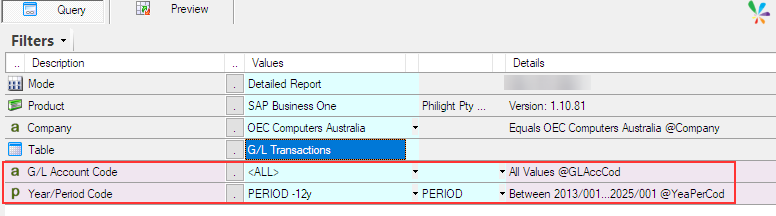
I am trying to show the value of one of the filters, ‘Year/Period Code’, in an expression.
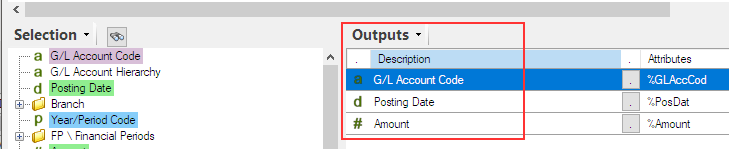
First, define the output item like this.
Adding filter reference in an expression
Add an expression and expand ‘Filter Named Values’ node in the function tree to display all named filters.
A named filter with ‘2’ at the end means ‘TO’ for a filter that has a range, from … to.
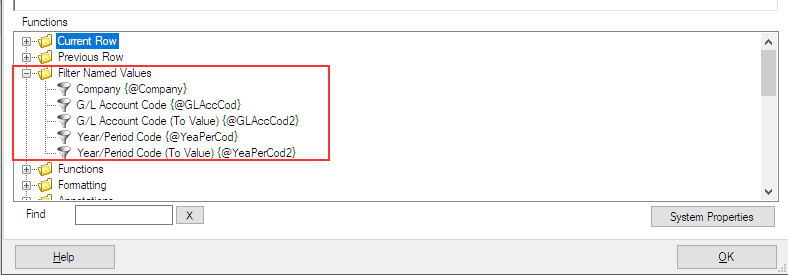
This time, I use ‘Year/Period Code {@YeaPerCod}‘ and ‘Year/Period Code (To Value) {@YeaPerCod2}‘.
Create a string by concatenating both references with the ‘+’ sign and a ‘-‘.
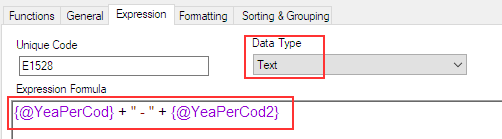
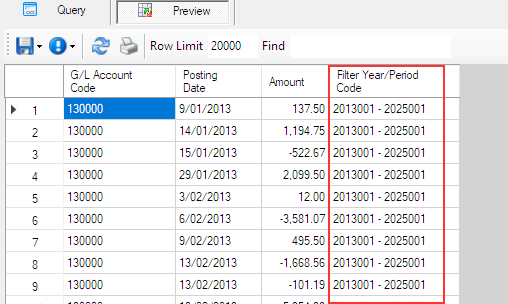
Preview the query, and it will show the values of FROM and TO for the filter.
Afterword
Filter references are often important when creating expressions to meet your business requirements, so it’s useful to understand them.
Back to Expressions.