
Users and User Groups
Users can access Sharperlight using a native login and password, or using a Windows authenticated user or a domain group. These users or groups need to be created in the User Details form in Site Setup. The User Details form has the high level settings but under each User they also have User Product Settings for each enabled datamodel connection.
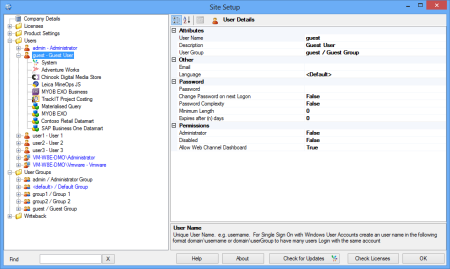
Site Setup – Users
On a clean installation of Sharperlight the default logins are admin, user1, user2, user3 and guest. All these logins will have blank passwords and the admin user will be set to be an Administrator. It is recommended that after the initial install and testing, the admin login should be set with a password and the other logins disabled. New logins should then be created for each end-user.
Attributes
- User Name
This should be a unique user name or a domain user account in the syntax DOMAIN\username or DOMAIN\usergroup. The User Name field has a lookup button that will search for available domains and user accounts.
- Description
The name of the user or domain group, it can be returned in a Published Query Title and in a query using an Expression.
- User Group
Users can be attributed to a User Group and they will all share the same group settings.
- Administrator
This switch can elevate a user login to have administrator rights. Administrators are not restricted by normal user restrictions and they can access Site Setup.
- Disabled
A True/False boolean with False disabling user access and changing their user colour to red in Site Setup.
Other
The email address is optional but it can be returned in queries.
- Language
This is the default login language and it will determine the translation of the application and datamodel layers.
Password
Passwords are optional if no length or complexity rules haven been applied. Irrelevant to Windows authentication user accounts.
- Change Password on next Logon
Force the user the change password on next login.
- Password Complexity
When set to True the password must conform to complexity rules where the password length must be at least 8 characters long and have a minimum of two characters that are alphabetic, numeric and punctuation respectively.
- Minimum Length
If set to 0 blank passwords are possible provided password complexity is not enabled.
- Expires after (n) days
Forces password to be reset after n days, if left as 0 the password will never expire.