
KENDO DataSource object using a Published Report (Query)
Introduction
The KENDO JavaScript library is bundled with Sharperlight and offers a variety of web UI controls that can be combined with Sharperlight published reports to create various web interfaces. In this post, I will focus on using the kendo.data.DataSource object, which is used to supply data to KENDO UI controls such as ComboBox, DropDownList, Grid, and more.
Practices
Here, I will show you how we can configure the kendo.data.DataSource object using a published report.
This is the JavaScript function to create the kendo.data.DataSource object.
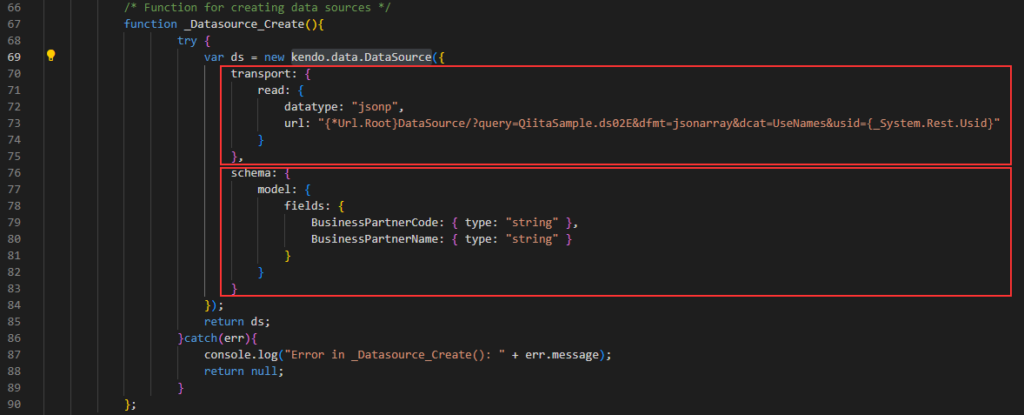
This function creates the datasource object and returns it.
There are two parts; “transport” and “schema”.
Transport
The URL for a published report is specified here and it returns a dataset in JSON so its datatype attribute says “jsonp”.
url: "{*Url.Root}DataSource/?query=QiitaSample.ds02E&dfmt=jsonarray&dcat=UseNames&usid={_System.Rest.Usid}"“{*Url.Root}” is a Sharperlight control tag and it is resolved as the base URL of the Sharperlight service at runtime.
“DataSource/” is a key word and it instructs the specified published report to function as a data source.”
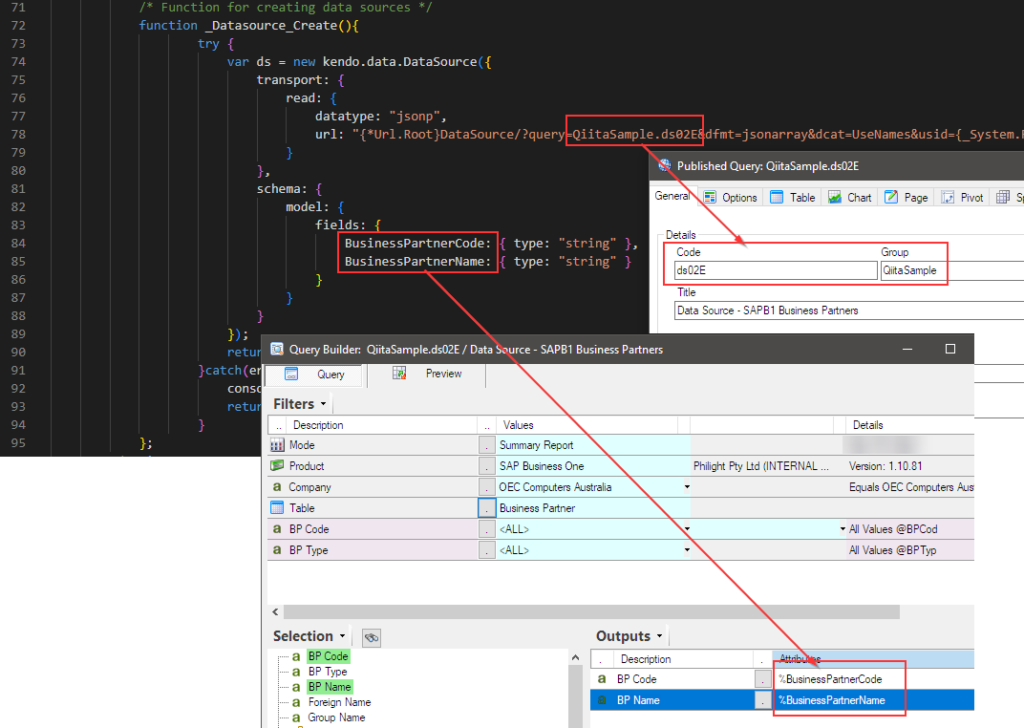
“?query=QiitaSample.ds02E” is the first parameter, specifying the Group and Code for the target published report.
“&dfmt=jsonarray” is the second parameter, indicating, ‘Please return the dataset as a JSON array.’
“&dcat=UseNames” is the third parameter, requesting that the output item names in the query be used as the column names in the returned JSON array.
“&usid={_System.Rest.Usid}” is the fourth parameter, adding the current user session ID. “{_System.Rest.Usid}” is the Sharperlight control tag used to return the current session ID at runtime.
Schema
The structure of the datasource is defined here.
All fields returned from the specified published report, or any fields you want to use, need to be defined here.
The field names defined here must match the output item names in the specified published report.
Afterword
This is an important object for using KENDO UI controls, as it provides data to various UI controls offered by KENDO library. Give it a try!.
See also;