
Expression: RowSkip
Introduction
I will introduce a Sharperlight Expression “RowSkip“, which skips row when the given condition is true.
Practices
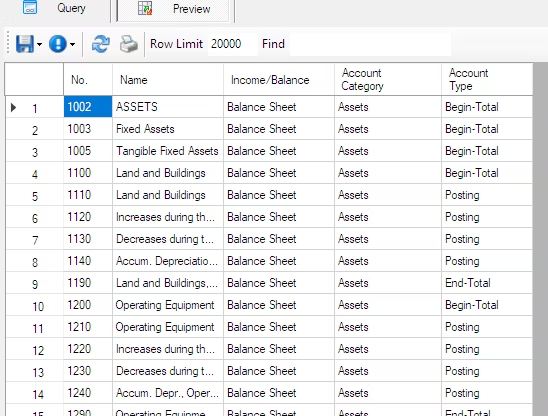
I prepared a query that returns the result like this.
Now add the RowSkip function.
Go back to your query, right-click on the output area, and select ‘Add Expression.’
When the Output Options dialog opens, locate the RowSkip function in the function list and double-click to transfer the template to the upper editor area.
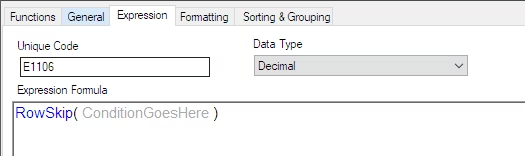
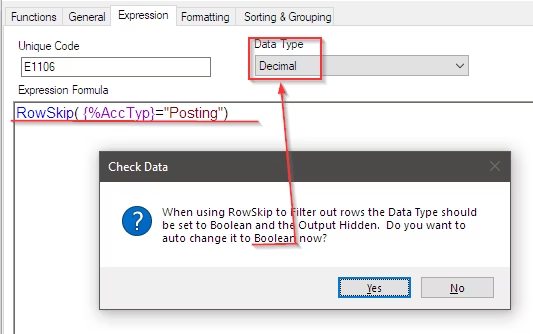
Edit the template as follows: This definition skips the row when the Account Type is “Posting“.
RowSkip( {%AccTyp}="Posting")After pressing OK, you will be prompted with the message “Change data type to Boolean.” Select Yes.
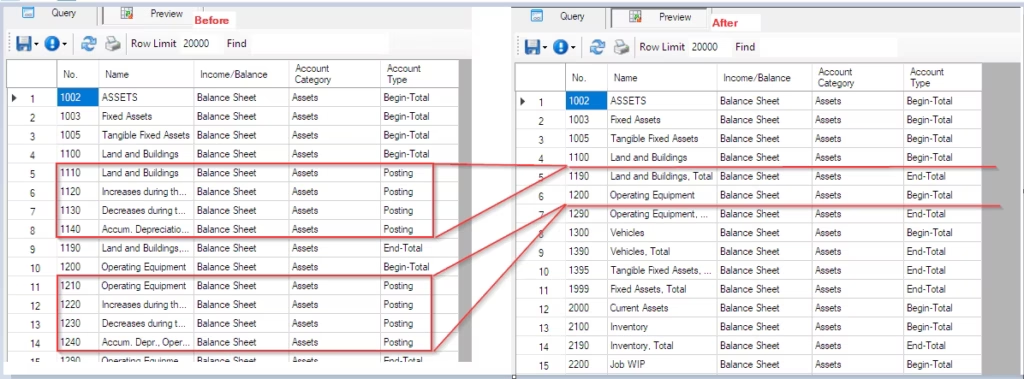
Now for the preview! All rows where the Account Type is “Posting” are skipped.
Afterword
This can be done by setting Account Type != “Posting” in the filter, but I used it this way to show how RowSkip function works.
I hope this helps with your work.