
Expression: IIF
Introduction
This post will explain the most commonly used statement: IIF in an expression.
Practices
Query Definition
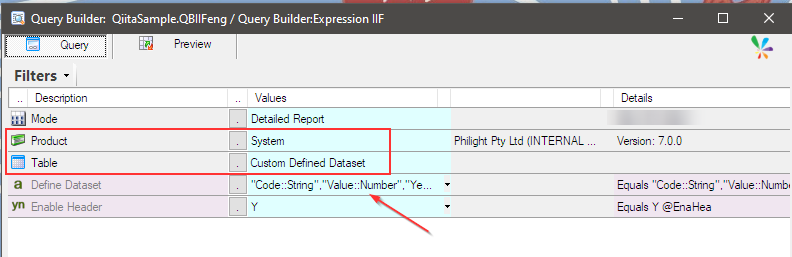
A simple query was prepared here and it uses Custom Defined Dataset.
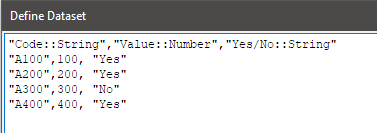
The dataset defined as a comma separated list is like this.
This is the output definition of the query.

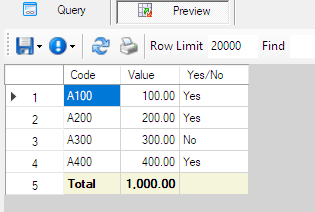
This is the preview of the query.
Creating IIF Expression
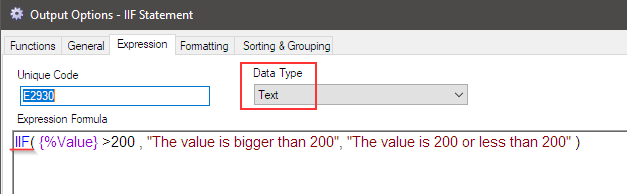
Add an expression and use the IIF statement so that the template is inserted.

When the given condition returns TRUE, the TrueValue part is executed; otherwise, the FalseValue part is executed.
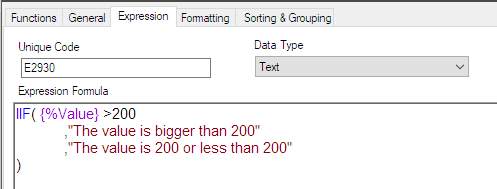
This time, I will create a scenario that displays the message ‘The value is bigger than 200’ when the value is greater than 200; otherwise, it will display ‘The value is 200 or less’ using the expression. The Data Type must be Text since it outputs a text message.
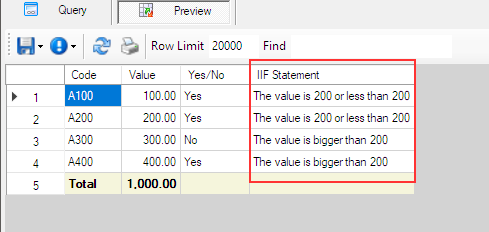
The preview shows that the expression worked and handled the scenario correctly.
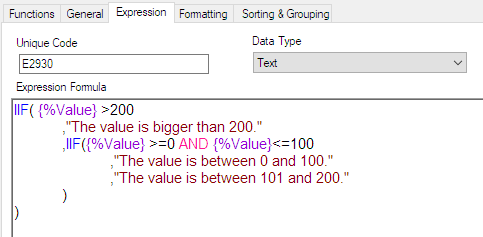
This is a simple example, but you may need to create more complex IIF scenarios. The IIF statement can also be nested and formatted like this for better readability.
The use of nested IIF statement.
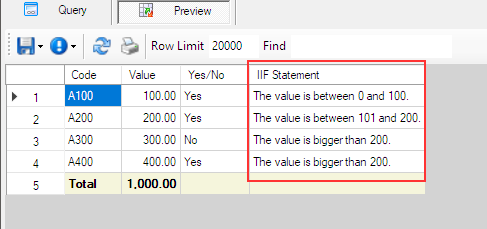
and its result.
Afterword
I believe the IIF statement is one of the most frequently used statements. I hope you will master it and create the reports you need for your business.